Hi
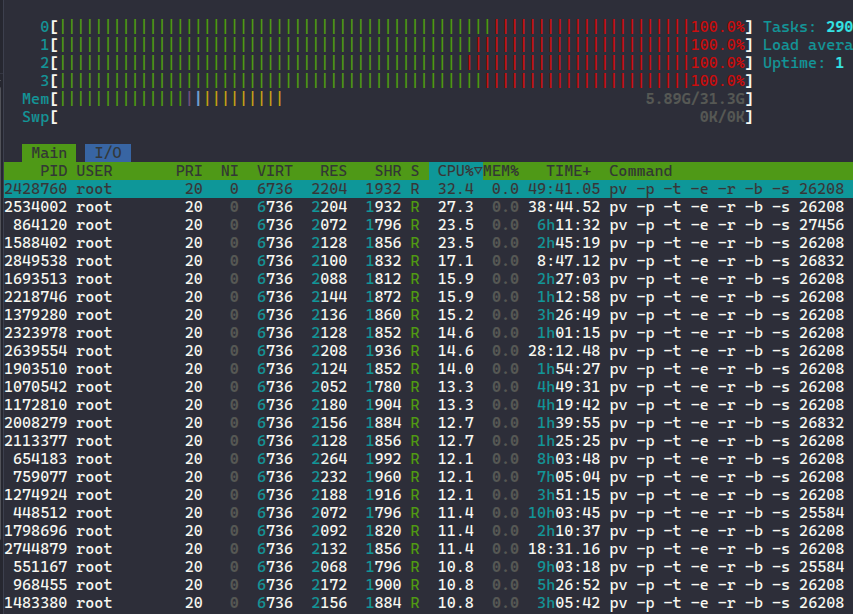
I have a sanoid/syncoid setup (on three nodes in a Proxmox cluster) where the backup server (the third node) pulls the snapshots from the production datasets to a separate backup disk in a separate zpool. Today I noticed the backup server suddenly ran at 100% CPU and has according to the Proxmox stats it has been doing so for almost 18 hours. Looking at htop the culprit command was pv -p -t -e -r -b (three processes). I searched through the syncoid script and found the exact reference so I thought it has to do something with syncing my snapshots
Here is the crontab on my backup server. I have three proxmox nodes and one pool on the third node is the backup server.
I first restarted the server but a few hours later I came back to see the load was up again to 100%. I then killed the processes and the CPU load, of course, disappeared. I will keep track of this the coming days but I am curious what can be the case of this, and if somebody has had this issue before and can help me troubleshoot it. I can post the output of zfs list if necessary.
After last night’s message there are over 20 processes. Can it be because some of the sync jobs are not done when the other one starts? Most of the times the server cluster is idle not doing any writes so the snapshot deltas are (apart from the dataset for scheduled proxmox backups) very small. I think I will comment out some of the entries in the crontab for now while I investigate the problem.
I’m curious what is the function of the pv program that gets called by syncoid? @mercenary_sysadmin
pv is short for Pipe Viewer, and is used for both providing the progress bar you see on interactive invocations of syncoid, and for rate limiting when rate limiting options are selected.
The issue here is that you’re beginning another syncoid job before the last one has completed, by the looks of it. A single syncoid run will only ever have a single pv invocation going at any one time. So either you’ve got lots of the same syncoid run going–because you’re beginning a new one before the last one completes–or you’re running far too many separate syncoid jobs in parallel.
Thank you for the info. I am away for the moment and will investigate it further when I get back. In the meantime I just commented out all but the PVE2 syncoid cron jobs, rebooted, and the problem didn’t come back so it seems it is like you said @mercenary_sysadmin too many jobs running. I will still re-enable them and check your suggestions @memnoch_proxy when I get back.
What you might want to do is set up file locking so that if a particular syncoid run is still ongoing, the next cron or systemd invocation of the same replication won’t fire off yet.