Apple Time Machine's Client Side Encryption vs. ZFS Compression and Snapshots: A brief Halloween Horror Story (or Mystery?)

Hello,

So, after a small adventure that I will document elsewhere since it led to some other questions and potential improvement requests for TrueNAS’ documentation, I’ve got a multi-user Time Machine backup setup configured on TrueNAS, with each Time Machine client backing up into a separate dataset. Using the TrueNAS built-in options for Time Machine shares, a ZFS snapshot is taken after each successful backup, and snapshots older than 7 days purge themselves. (The process to set this up is a bit obscure, so I’ll document it elsewhere).

What I’d like to focus on and get some help with is the size of my ZFS snapshots and the complete lack of compression on my Time Machine dataset for my test Mac.

  1. The dataset is using the LZ4 default compression;
  2. Encryption is disabled on the dataset;
  3. On the test Mac, encryption is enabled;
  4. The test Mac backs up (and ZFS takes a snapshot) every hour; and
  5. I have observed TrueNAS purging the oldest snapshots on schedule.

That is all, somehow, despite my middling competence, working as intended. However, my dataset looks like this:
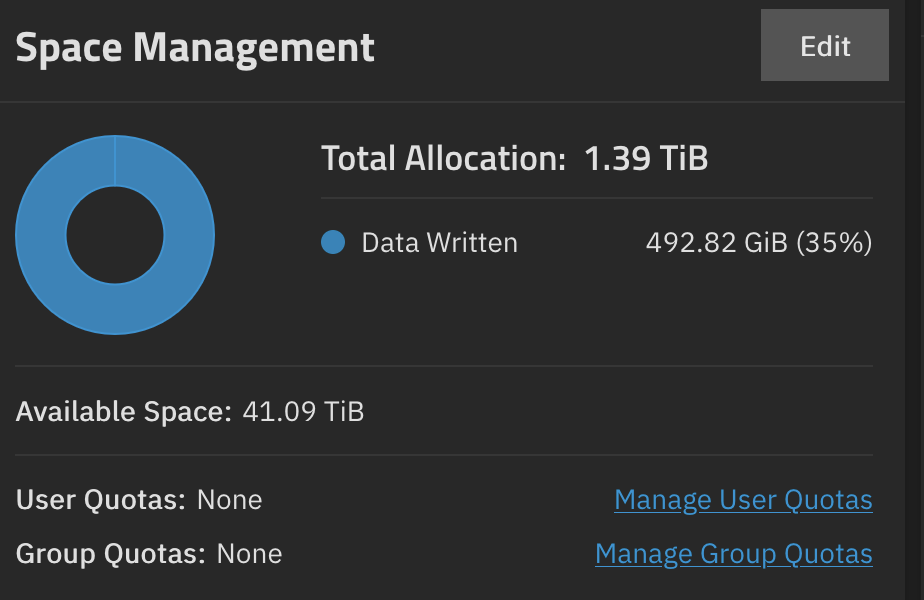
Yes. 35 percent of the 1.39 TiB there is my actual Time Machine sparsebundle, and the rest is ZFS snapshots.
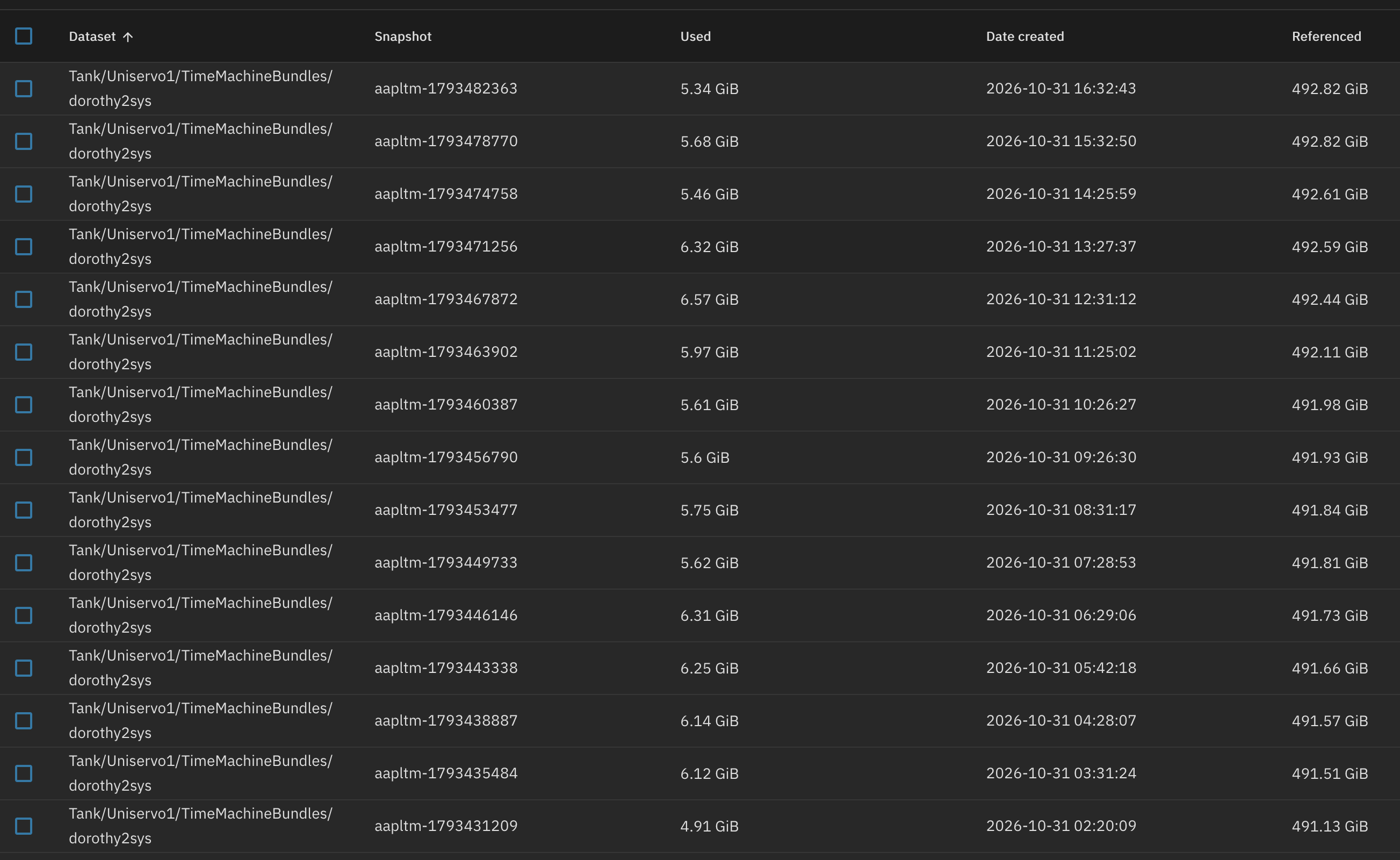
Now, I suppose it’s possible that I’m somehow writing 4-6 GiB of data per hour to my SSD, even when my system is idling overnight. But somehow I doubt it.

So, that’s ridiculous and I’m pretty sure it’s not how that’s meant to work for a client system that sits idle most of the time.

(I’m sure I need to further flesh out my Time Machine exclusions, as the Mac copies ~1.5-2.0 GiB to the NAS on every backup, but that’s a separate problem. I don’t want to get distracted dealing with my Exclusions list until I’ve got a better handle on what’s happening on the storage server. Still, a suggested exclusion list for Time Machine would always be appreciated. :slight_smile: )

I promised (or suggested) that there would be questions so:

  1. Is the lack of compression because I’ve encrypted the data on the test Mac itself? When I saw a compression ratio of 1, I assumed that ZFS is looking at the encrypted TIme Machine data and noping out.
  2. Fellow Time Machine enjoyers, is it normal for your snapshots to be this huge? I can’t imagine it’s meant to be this way, and I assume, again, that it’s got to do with the client-side encryption. It makes sense that ZFS can’t track real block deltas on data that’s encrypted before it arrives.
  3. Would using ZFS’ own encryption get me a better result? I’m assuming that without encryption on the client-side, incoming data would be compressed before encryption, and something something snapshots would have a better time with block deltas on things ZFS encrypted itself. Maybe.

Ref: Part of a series on my Time Machine/ZFS/TrueNAS fumblings at: My Adventures with TrueNAS, ZFS, and Time Machine: A Master Post

I think the issue here is encryption on the Mac side somewhat magnifying the churn you’re already and unavoidably getting from ephemeral data. You’re showing each snapshot having roughly 1% of its data as unique to that snapshot, which sounds pretty feasible to me for backing up what is essentially an encrypted database binary type working set, assuming my loose understanding of Time Machine’s internal workings is as roughly accurate as I think it is.

Assuming I’m correct about that, the question then becomes: do you NEED a one hour RPO on what essentially amounts to a backup of a backup, or would a 24 hour RPO be sufficient? Because I strongly suspect you’ll have about the same 1% unique per snapshot whether those snapshots are taken every single hour, or only once per day.

Also keep in mind that those time machine backups should be entirely consistent and available after each one finishes, regardless of the snapshot. So you still only have a one hour RPO in the vast majority of cases if you continue backing up hourly but only snapshot once daily; your RPO only extends to 24h if the most recent backup is corrupt but the up to 24h old one in the most recent snapshot is viable.

You can test this easily by just disabling your automatic snapshot temporarily, then manually taking two snapshots 24h apart and diffing them. If it turns out I’m right, then change your automatic snapshot script to only the snap after each day’s midnight (or whenever) backup, letting the other backups complete but without snapshotting them afterwards.

Thanks! That makes sense; I wasn’t thinking of it as an encrypted database binary.

(The sparsebundle is, as I understand it, a disk image file formatted in APFS, which is the only format that modern Time Machine really knows how to work with.)

I’m definitely going to wipe and re-create the TM backup after I’ve refined the exclusion list. This was a first test of this whole setup; I kind of assumed I’d end up having to wipe it out eventually. I just didn’t anticipate the gigantic snapshot sizes. (Though, in retrospect, I should have.

Do you think there’s any real disadvantage for home/small office use by letting TrueNAS itself handle the encryption, instead of Time Machine itself? My understanding is that the dataset would be unencrypted while the NAS is on, and encrypted when the NAS shuts down, which seems sufficient.

On this point, I’m constrained by a mix of Time Machine and TrueNAS itself.

  • On the Mac: Time Machine offers hourly/weekly/monthly scheduling. All the times it’s saved my bacon, it’s been from data I accidentally deleted within hours or days, so I want to stick with hourly, there.
  • On TrueNAS: The current Time Machine integration is a relatively new feature, and it’s currently pretty inflexible.
    • When automated snapshot creation is enabled, a new snapshot is created after every successful Time Machine backup (so, the snapshot schedule is tied to the target Mac’s backup schedule);
    • A week’s worth of snapshots are retained. (So, for hourly snapshots, about 162 or so.) After that, older snapshots are purged.
    • Neither the auto-creation schedule nor the purge schedule is editable by the TrueNAS admin.

Based on older conversations here, I’d planned on keeping a week of daily snapshots, but the automated tool doesn’t allow for that.

But from this conversation, I think it would be reasonable to ask for an option to snapshot the sparsebundle once every 24 hours. I think there’d need to be a bit of trick to to it to avoid snapshotting a partial Time Machine backup, but the TN dev that works on Time Machine stuff would know the best way around that.

-- – –

I’m going to admit I had to look up RPO.

Recovery Time Objective (RTO) and Recovery Point Objective (RPO) are important disaster recovery metrics used in system design to ensure business continuity during failures. RTO defines the maximum acceptable downtime, while RPO defines the maximum acceptable data loss after a failure.

  • RTO focuses on how quickly systems and services can be restored after an outage.
  • RPO focuses on how much recent data the system can afford to lose during failure.

I can’t really answer that for you. You already hit on the potential pain point: the data isn’t encrypted while the NAS is online, so if your NAS gets popped, your data can be exfiltrated in the clear.

The question is, is this really a scenario you should be focusing on? Generally speaking, the NAS should be presenting less attack surface than the Mac that’s pushing backups to it, despite truenas having such a heavy interface and so many services, many of which you’re probably not even using, available.

This is weakened a bit because you’re pushing backups to the NAS rather than pulling them from the source, which means if your source gets popped, your backups are one short step away. But to be fair, that’s a problem that already presumes your Mac got popped first–so if that’s the attack vector necessary to pop the NAS, your data was already available to exfil in clear anyway.

Which gives you my answer to your dilemma for me. But this isn’t my homelab, isn’t my data, and isn’t my direct concern. What you need to do now is work through the reasoning I used to arrive at what the answer for me was, and decide whether it’s the right answer for you also. :beer_mug: