Hello everyone,
Is it viable to use ZVOLs in production environments?
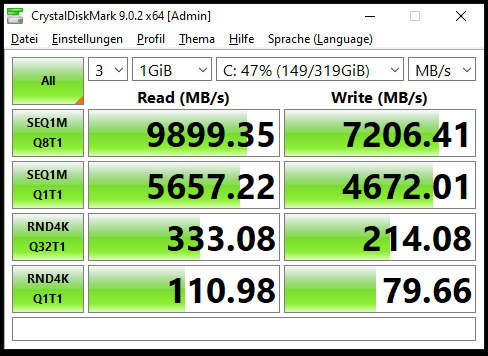
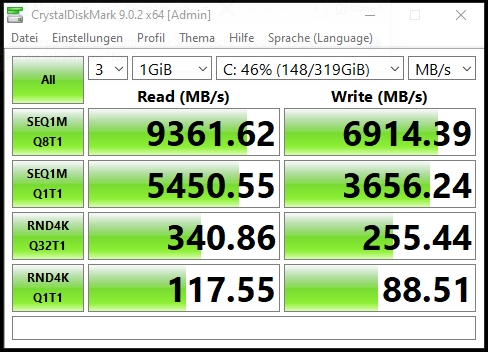
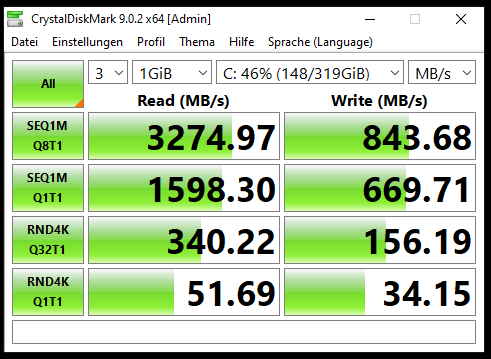
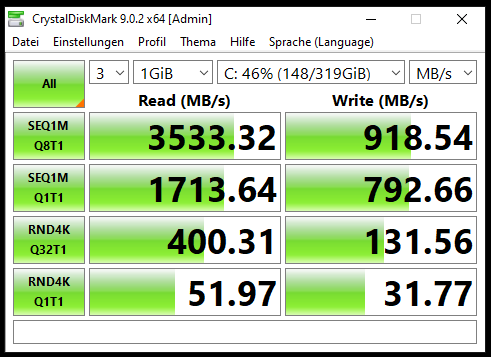
In my virtual lab tests, I’ve observed significantly lower performance compared to datasheet expectations, regardless of pool configuration or block size. While overall tuning does improve performance, it still doesn’t come close to what the datasheets suggest.
All tests were conducted on FreeBSD 15 with OpenZFS (zfs-2.4.0-rc4-FreeBSD, same version in kmod). From what I’ve researched, this seems to be a widespread issue in OpenZFS, regardless of version or operating system. I’ve also come across mentions that performance was slightly better in older OpenZFS versions.
The threads I’ve reviewed on this topic include:
- performance zvol : r/zfs
- [Performance] Extreme performance penalty, holdups and write amplification when writing to ZVOLs · Issue #11407 · openzfs/zfs
Up to this point, everything relates to OpenZFS. To broaden the comparison, I decided to test Oracle ZFS on Solaris. I set up a lab using Solaris 11.4 on x86 (although I understand SPARC would be the ideal platform, I unfortunately don’t have access to that hardware). To my surprise, ZVOL performance on Solaris is very similar to what I observed with OpenZFS. This leads me to think the issue may not be specific to the implementation (OpenZFS vs. Oracle ZFS), but rather something inherent to ZVOLs themselves.
Allow me a brief aside: although Solaris is a declining operating system, I think it’s still useful as a point of comparison. I also found it interesting that it supports high availability for ZFS through Oracle Solaris Cluster 4.4, which seems relevant for production environments.
Additionally, Oracle offers a storage solution called ZFS Appliance. I’ve tested its OVA, and it appears to be a highly sophisticated system with LUN support. It’s hard to imagine that a product at that level would suffer from the same ZVOL performance limitations seen in Solaris or OpenZFS.
For this reason, I’d be very interested to hear from anyone who has worked with a real SPARC-based setup and can share their experience especially regarding ZVOL performance.
Thanks in advance.