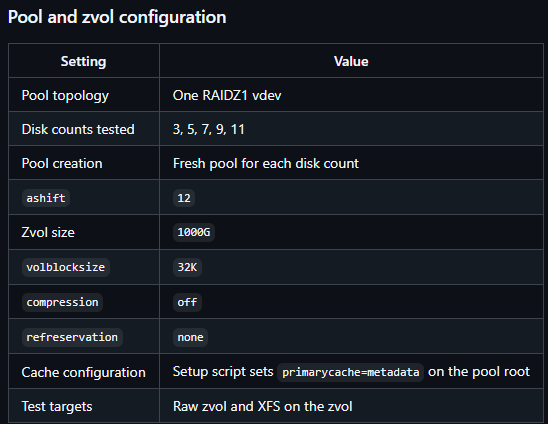
We tested 3-, 5-, 7-, 9-, and 11-disk configurations. Each configuration used a newly created pool containing a single RAIDZ1 vdev.
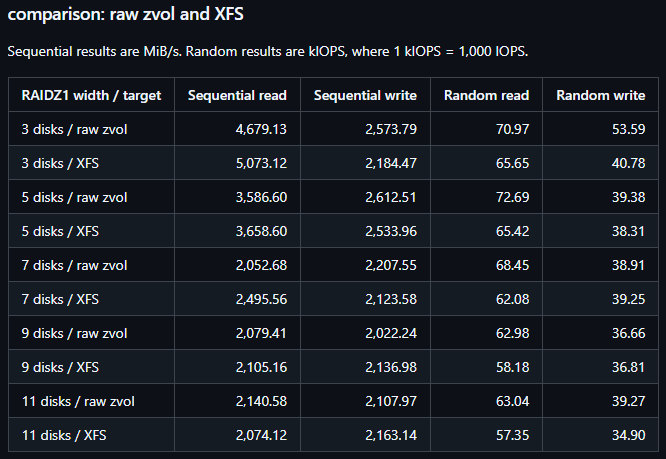
I’d like to understand why performance decreases as the disk count in a single RAIDZ1 vdev increases.
Because as the width of your Z1 increases, the size of the per-disk workload decreases, making for less-efficient reads and writes.
You have a 32KiB volblocksize, which–assuming 4KiB sectors, and ashift=12–means that you’re splitting each individual 32KiB block into up to eight 4KiB pieces, forcing the individual drives to do 4KiB random I/O–the most punishing possible workload.
Although, given that your drives are NVMe, it’s entirely possible you’re splitting the workload up even tinier–IME most NVMe drives present as 512B, therefore ashift=9 and you might be doing smaller than 4KiB random I/O per drive.
If you want to see radically higher performance, you want to split those drives into multiple narrow vdevs. For nine drives, and given that you’re already looking at Z1, you most likely would want three 3-wide RAIDz1 vdevs.
Other high performing topologies include mirrors (eg 5x 2-wide mirror at 10 disks total), or multiple RAIDz2 if you’re more interested in additional parity to reduce the likelihood of needing to hit backups (eg 3x 4-wide Z2 or 2x 6-wide Z2 with a total of twelve disks).
Finally, if you’re chasing maximum performance, you want to use a topology that can split blocks evenly–eg 3-wide Z1 (two data blocks per stripe, so 32KiB/2 == 16.0 KiB) not 4-wide Z1 (three data blocks per stripe ==> 32KiB/3 == 10.667KiB)
Finally, zvols don’t perform anywhere near as well as .raw files with loopback mount, so you might want to consider going in that direction if your application permits… and also depending on workload, that blocksize might or might not be appropriate. I usually recommend 64K as a default blocksize for VM workloads, unless you’ve got heavy database or other smaller block/page size I/O workloads in the VM.
The larger your recordsize / volblocksize, the larger those pieces-per-drive when you’re divvying the blocks up for a RAIDz topology. (For mirrors, the individual blocks are stored intact on individual drives, so this is less of a concern.)
As a final note, if you’re interested in the deep learning on this stuff, I highly recommend you read my ZFS vs conventional RAID shootout on Ars Technica from a few years back, which goes much deeper into the hows and whys of performance differences between ZFS and conventional filesystems on top of conventional RAID:
If you really want to dive down the rabbit hole, I recommend the entire Storage Fundamentals series that I wrote there:
Thanks for the explanation! I’ll read through your Storage Fundamentals series.
My application requires zvols, so I need to keep testing with them. To clarify, I’m using ashift=12 and volblocksize=32K, although some NVMe drives report 512-byte logical sectors. I’m not sure whether that could be an issue, but I’ll look into it.
I also tested two 5-disk RAIDZ1 vdevs, which outperformed a single 10-disk RAIDZ1 vdev, consistent with your recommendation.
I’d still like to understand why adding disks to a single RAIDZ1 vdev reduces overall performance, rather than simply providing no further gains. Your point about smaller per-drive I/O helps—could you elaborate on why this leads to a decline, or suggest measurements to investigate it?
The smaller blocksize the I/O, the more IOPS are necessary to perform the operation.
This is easiest to understand (and the most obvious to see) on rust drives, where a head seek accompanies most individual operations, but it applies to SSDs also. In the case of SSDs, what you have to remember is that the SSD is essentially a tiny RAID array in a box all by itself–in order to get the maximum throughput out of the SSD, you need to issue operations large enough to span across several individual banks of the underlying physical flash medium. Smaller operations that cannot be parallelized inside a single SSD this way will only hit one or two banks, getting only a fraction of the expected throughput out of the drive for the same amount of data.
With every drive you add to the width of a RAIDz array, you are cutting down the size of the individual I/O operations per drive, making each drive perform more slowly than it did when in a narrower stripe with larger individual operations.
Ideally, you’d like to see 64KiB operations on each drive, if possible. You don’t really get the maximum throughput performance out of a drive until you’re into 1MiB individual operations, but the pain doesn’t really start to hurt until you dip below 64KiB. That’s not always going to be practical, obviously–if you’re only working with 64KiB blocks to begin with, running a much larger recordsize will wind up costing you performance due to read amplification. But to the degree possible, you want to keep the individual operation size as large as possible in order to maximize the performance of your individual drives.
In practice, keeping vdev width narrow–and increasing vdev count, instead of width, if you’ve got a lot of drives to use–is the most practical way to keep that individual per-drive I/O size high. Bumping recordsize up is very helpful when it’s pragmatic to do so–I’ve seen people running 4M recordsize on datasets that only serve bulk data without random I/O inside individual files on that dataset, for exactly this reason–but, like I said, depending on workload that might not really be feasible for you.
Generally speaking, when performance tuning, I advise recordsize no larger than double the expected individual block size an operation might request. So for example if you’re running MySQL InnoDB, with 16KiB database pages, you don’t generally want recordsize larger than 32KiB.
If you’re running recordsize=32KiB, your best bet is mirrors, since mirrors don’t cut the I/O size down smaller than the recordsize itself. If you run 3-wide RAIDz1, you’ve cut that down to 16KiB, which means the drives perform less efficiently for the reasons stated earlier. If you run 5-wide RAIDz1, now you’re down to 8KiB. If you run six wide Z1, you’re down to 8KiB and you can’t actually split the workload up evenly among all six disks, so you wind up with useless padding that reduces performance and storage efficiency even further.
If you run nine-wide Z1, now you’re all the way down to 4KiB random I/O per drive, which is massively punishing, and when you hit ten-wide… well, now (assuming ashift=12 and 4KiB sectors) you’re doing the minimum size I/O per drive and you can’t actually split a single stripe among all drives, which means each stripe read or write occupies all but one of your drives… and you can’t address the next stripe off of the only one drive that isn’t occupied from the first stripe read or write, which means you’ve got completely wasted, unusable IOPS on some of your drives at all times, no matter how busy the server is.
Moving back to the question of ashift: in my experience, the vast majority of NVMe drives are designed for 512B sectors, aka ashift=9. This is because unlike ATA, which only has a single command queue, NVMe supports thousands of concurrent command queues… so it makes sense to carve up I/O requests into smaller pieces, which can then hopefully be reassembled into a stream that makes use of the most of the underlying drive’s physical capabilities.
But even with NVMe and its incredibly large queues, you still want the individual operations you stick into the queue to be as large as possible, up to (but not exceeding) about double the actual underlying I/O size of the applications you’re servicing.
Thanks for taking the time to explain this in more detail! I’ll work through your explanation and the articles you recommended to better understand how this applies to my tests.