I have the latest version of TrueNAS scale as my client. On the server / replication destination it’s Debian Bookworm:
‘’’
root@rescue ~ # lsb_release -a && zfs --version
No LSB modules are available.
Distributor ID: Debian
Description: Debian GNU/Linux 12 (bookworm)
Release: 12
Codename: bookworm
zfs-2.4.0-1
zfs-kmod-2.4.0-1
‘’’
My initial replication moved over 2 of my smaller-ish data sets just fine, but when it hit the third, which is much larger, it’s just been sitting there for days so I grew suspicious. When I ran an strace on the zfs recv I see sitting there I got:
‘’’
root@rescue /backuppool/received-backups # strace -p 222489
strace: Process 222489 attached
ioctl(4, ZFS_IOC_RECV_NEW, 0x7ffc1ed0f450) = -1 EBADE (Invalid exchange)
ioctl(3, ZFS_IOC_OBJSET_STATS, 0x7ffc1ed13750) = 0
write(2, “cannot receive resume stream: ch”…, 512) = 512
rmdir(“/backuppool/received-backups/homes”) = -1 EROFS (Read-only file system)
readlink(“/proc/self/ns/user”, “user:[4026531837]”, 127) = 17
ioctl(3, ZFS_IOC_OBJSET_STATS, 0x7ffc1ed11c40) = 0
close(3) = 0
close(4) = 0
exit_group(1) = ?
+++ exited with 1 +++
‘’’
This seems … Not so good Does anyone have any thoughts on what I should do and how I can/should recover?
Thanks in advance!
lUpdate: Maybe it’s actually working OK? I took another look..
‘’’
root@rescue ~ # ps -deaf | grep zfs
root 222676 222667 0 21:59 ? 00:00:00 sh -c PATH=$PATH:/usr/local/sbin:/usr/sbin:/sbin zfs recv -s -F -x mountpoint -x sharesmb -x sharenfs backuppool/received-backups/homes
root 222679 222676 0 21:59 ? 00:00:37 zfs recv -s -F -x mountpoint -x sharesmb -x sharenfs backuppool/received-backups/homes
root 225476 224218 0 23:07 pts/1 00:00:00 grep zfs
root@rescue ~ OpenZFS
‘’’
and if I strace that first zsh recv process I see a TON of happy looking writes:
This strongly indicates that the replication got interrupted at some point, TrueNAS tried to resume it in-place using a resume token, but the target doesn’t have a matching token so the resume won’t work.
I ran into this issue with Syncoid a few months after we first implemented support for resume; I had to manually destroy the resume token on both sides to get past it then. After that, we refactored our support to detect failures to resume an interrupted send, and in the case of failures, automatically discard the resume tokens and begin a new incremental replication instead.
That’s not usually as bad as it sounds–say you interrupt a replication that’s sending 100 snapshots to the target, halfway through snapshot 51. With resume support, you’d pick that transfer up right where you left it–halfway through snapshot 51. Without resume support… you’d just pick it up from the beginning of snapshot 51.
Resume support can be really handy if your first full gets interrupted mid-stream, but it’s usually not really all that big a deal for incrementals later, since you don’t have to finish the entire stream for each completed snapshot to become permanantly available.
OK so I have one zsh recv that seems dead because its replication got interrupted, but the other seems happily streaming away doing writes.
So, it seems to me like I should just leave it alone, and when the working recv finishes the (large) chunk it’s working on, it’ll retry the failed one?
Or do you recommend more/other manual intervention?
I’m not sure if you’ve got multiple replication processes running targeting different datasets concurrently, so I’m not really sure. Keep an eye on it.
But I suspect you’ve got an invalid resume token and you’ll need to manually intervene later.
Thanks for that. What I suspect is happening here is that TrueNAS does one replication per data set.
It did 2 data sets successfully, and failed trying to do a third (Possibly my gigantor /homes data set) but retried and is now in process of replicating that giant data set.
So as you say, I’ll watch the process carefully, not interrupt the one that seems to be running well, and just ensure that in the end analysis all data sets have cleanly and successfully replicated.
I suppose this is the price you pay when you let a web GUI do the driving. Caveat emptor!
I do suspect though that given the chonky nature of my data set that I may be looking at total transfer times measured in weeks.
And that’s OK. When I first did an offsite backup with the Synology using Hyperbackup to Backblaze B2 ISTR it took like 2 weeks.
So I’ve just gotta be patient. Keep watching the processes that are working and monitoring the general state of both systems, and hope for the best. If I can get this done I suepct I’ll have a nice offsite backup mechanism for a really nice home NAS.
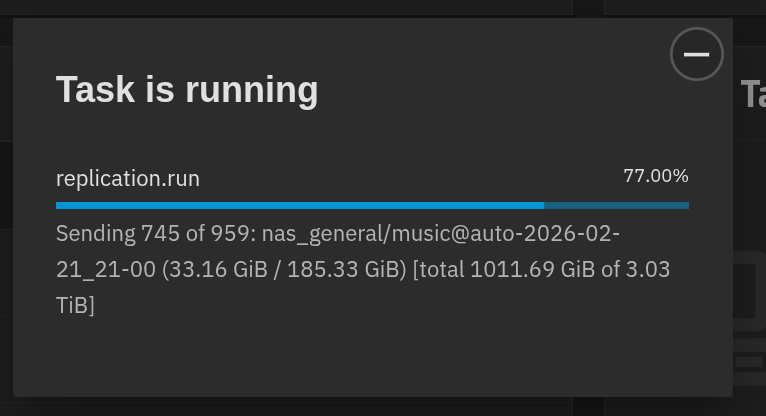
Welp, I was wrong! It looks like it finished “homes” and is now onto “music”. Its progress bar was showing a mere SLIVER of completion before! A quick glance at the replicated data on my Ubuntu backup server seems unscientifically to have everything I expect.
Initial replication finally completed about an hour ago. Cleanly as far as I can tell.
This likely isn’t going to be my forever solution because the Hetzner server I’m renting has 2 4T disks of which I’m currently using 3T.
We’ll see what the actual month to month run cost looks like. They cite the $38/mo as “maximum” so maybe if the server is mostly sitting there mostly saying “Nope no changes here!” it’ll wind up being cheap enough that I can bump it up to a bigger disk size.
Still happy with my choice in any case because even if I do need to go with zfs.rent or similar I’ve put off the spend of another 2 HDD set.
Thanks for your help getting this all going. It’s nice to finally be doing something like adulting for my home storage needs, and I am incredibly impressed with ZFS as a software project.
 Does anyone have any thoughts on what I should do and how I can/should recover?