Sorry I fell off the edge of the world on this. Real life intervened and danced on my spleen a bit; I had to step away from deploying this server for a while.
I’m just now getting back to it. With an unformatted disk, hdparm -t gives ~ 3.0 GB/s on read. This is a Dell Precision 3660T, and the drive is hooked up via a u.2 to m.2 adapter; if 3.3 GB/s is the theoretical maximum, that seems pretty reasonable for this MacGuyver’d setup.
I’ll absolutely do more thorough testing once I have a partition and filesystem on here. (It’s probably going to be ext4 or xfs; I’ll be using it as a storage drive in a gaming/local AI VM, so I’ll likely end up on CachyOS or Endeavour.)
Confusing. I’m trying to sort that out this weekend. By default, unformatted and unmounted in Debian 13, the disk appears to consume 25 watts of idle power.
That is unacceptable, but it’s also adjustable.
I noticed this in the SST 3.0 (the management utility) manual:
Power Governor Mode (vendor unique). Three modes are supported:
• 0: 25-watts for PCIe NVMe devices; 40W for PCIe NVMe x8 devices; Unconstrained for SATA devices.
• 1: 20-watts for PCIe NVMe devices; 35W for PCIe NVMe x8 devices; Typical (7-watts) for SATA devices.
• 2: 10-watts for PCIe NVMe devices; 25W for PCIe NVMe x8 devices; Low (5-watts) for SATA devices.
Using the same tool, I have confirmed that I’m in mode 0, so it’s working as intended.
The question I’ve yet to find an answer to is how is performance or data integrity impacted at mode 1 or mode 2. I have a vague idea that it’s not just throughput, but also potentially an impact on the power loss protection features.
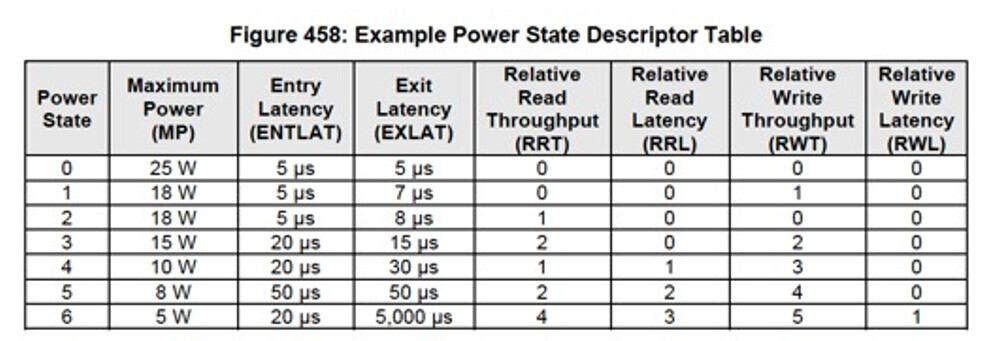
I did see something in the SST manual about raw NVME commands, but also, in the article you linked (which I’m going to have to read when it’s not fifteen minutes to midnight  , I saw this table:
It looks like Intel’s
mode 0, 1, 2 correspond roughly to NVME power state 0,
something custom (?), and 4, respectively.
(It’s also possible Intel modes are completely custom and don’t map well to the native NVME modes.)
Apparently, I can use the identify command from the nvme tools to confirm that, so I’ll try that this weekend. If that chart’s accurate, it definitely gives me an idea of the types of performance impacts I’d see from choosing the 10 watt power mode. I don’t know what entry and exit latency are (though I am vaguely guessing the latency associated with starting/stopping an I/O operation), and I’m completely lost on relative latency for now, but it looks like there’d be a noticeable hit on read throughput and an approximately 3x worse hit on write throughput.
I’ll have to see how the drive behaves when it’s properly formatted and mounted inside a VM. Here’s hoping the OS can actually force it to idle at less power without futzing with the NVME power states.